
rust
Pulsar's Reflection System: From Macro to Properties Panel
A deep dive into how Pulsar's runtime reflection system works — from the EngineClass derive macro and property attributes through to the Properties panel that uses that metadata to generate a live editing UI with zero handwritten widget code.

The Problem With No Reflection
Game engines need to do something that Rust's type system doesn't naturally support: at runtime, given an arbitrary component that was just loaded from a scene file or clicked in the editor, describe that component's fields, read their current values, display them in a panel, let a user edit them, write the new values back, and serialize the result to disk. All without hard-coding anything specific to that component type in the editor itself.
Unreal solves this with UPROPERTY macros and a large code-generation step. Unity uses C# attributes and .NET reflection. In Rust we have neither of those things — there is no standard runtime reflection API, and the borrow checker makes type-erased mutable access genuinely tricky. So we built one.
Pulsar's reflection system lives in the pulsar_reflection crate and is composed of a few layered pieces that work together. There is the EngineClass trait and its derive macro, which annotate component structs with property metadata. There is the Reflectable trait and its derive macro, which give runtime type information to any individual field type. There is the pulsar_type! macro, which registers primitives like f32 and [f32; 4] with both serialization logic and a property editor UI function. And there is the properties panel in ui_common, which reads all of this metadata and assembles a live editing UI without knowing anything specific about the component being displayed.
Defining an Engine Class
The entry point for any component is the EngineClass derive macro. At its simplest, you annotate a struct with #[derive(EngineClass, Default, Clone)] and mark individual fields with #[property] to expose them to the reflection system.
The derive macro generates an implementation of the EngineClass trait, which provides a class name, a get_properties() method returning a vector of PropertyMetadata, a create_default() constructor, and typed downcast helpers. It also submits a registration entry into the global EngineClassRegistry via the inventory crate, so the engine can enumerate all known component types without a manual registration table anywhere.
The trait itself looks like this:
Every field annotated with #[property] contributes one PropertyMetadata entry to the get_properties() result. The metadata carries the field's name, a human-readable display name (auto-generated from the identifier with capitalize_first), the property's category if any, and two type-erased closures — a getter and a setter — that the editor uses to read and write the field value without knowing the concrete struct type.
The getter and setter are generated by the macro at compile time as closures that downcast the trait object to the concrete type and access the field directly. Because the downcast target is baked in at macro-expansion time, there is no string-based field lookup at runtime — it's a direct memory access behind a fat pointer call.
The #[engine_class] Attribute Macro
While #[derive(EngineClass)] does the heavy lifting, typing out separate derive attributes for Default, Clone, Serialize, Deserialize, and a category can get repetitive. The #[engine_class(...)] attribute macro is a shorthand that bundles all of that into a single annotation:
This expands to derive attributes for EngineClass, Default, Clone, Serialize, and Deserialize, plus an #[engine_class_category("Rendering")] attribute that controls how the component appears in the editor's "Add Component" menu. The attribute macro also supports two important extra flags:
runtime_behavior— causes the macro to submit aRuntimeBehaviorRegistrationthat connects the component to aComponentRuntimeBehaviortrait impl, letting it participate in the runtime scene sync loop.scene_props_applier— registers aScenePropsApplierRegistrationthat allows the component to project its data into the scene's top-level props map for the renderer.no_register— suppresses the global registry submission and marks the type as anEngineSubPropsfor use with the#[sub_props]field flattening feature described below.
The runtime_behavior path is the bridge between the reflection system and actual engine behavior. A component with this flag must separately implement ComponentRuntimeBehavior:
The #[register_runtime_behavior] attribute on the impl block submits the registration automatically via inventory::submit!, so there is no manual list to maintain. Every component with runtime behavior opts in at its own definition site.
Property Categories
Properties can be organized into collapsible sections in the editor UI using the #[category] attribute system. You first declare the categories on the struct, then reference them by name on individual fields:
Category declarations carry an optional category_color (a hex string used to tint the category header in the UI) and default_collapsed (a bool controlling whether the group starts collapsed). Properties that reference a category that has not been declared produce a compile error — the macro validates this at expansion time so missing category references can't slip into a build. Categories are rendered in the order they are declared on the struct, and each PropertyMetadata carries both the category name and its ordinal index so the panel can sort them correctly even when properties from multiple structs are merged together.
Sub-Props: Flattening Nested Structs
Sometimes you want to group related properties into a nested struct while still displaying them all in the same flat property panel section. The #[sub_props] field attribute handles this by flattening a nested EngineClass into the parent's property list at reflection time:
When StaticMeshComponent::get_properties() is called, the macro-generated code iterates the sub-props fields and extends the property list with re-wrapped getters and setters. The re-wrapped closures capture both the parent struct type and the sub-field name, so they downcast the parent first and then delegate to the inner field — the panel sees a single flat list and never knows the nesting exists. The no_register flag on TransformProps prevents it from appearing in the "Add Component" menu as a standalone component, and the EngineSubProps marker trait enforced at the #[sub_props] call site ensures you can't accidentally use a top-level component as a sub-props source.
Blueprint-Callable Methods
Properties aren't the only thing the reflection system exposes. Methods can also be reflected for use in the Blueprint visual scripting system. The #[component_methods] attribute on an impl block scans for #[method]-annotated functions and registers them via inventory:
Each #[method] annotation generates a MethodMetadata entry with the method's name, display name, a MethodType enum value (Pure for read-only queries, Fn for mutations, ControlFlow for branching operations), a list of MethodParameter entries each carrying RuntimeTypeInfo for their types, and a MethodCaller — a type-erased closure that unpacks a Vec<Box<dyn Any>> and calls the concrete method with properly typed arguments. The EngineClass derive macro also auto-generates getter and setter methods for every #[property] field, so blueprint graphs can read and write component properties without any additional annotation.
Runtime Type Information: RuntimeTypeInfo and Reflectable
Property metadata carries a &'static RuntimeTypeInfo for every field. This is the piece that lets the editor decide what kind of widget to show without an exhaustive match on an enum of known types. RuntimeTypeInfo is a struct captured entirely at compile time:
The structure field is the interesting part. TypeStructure is an enum that describes the shape of the type without enumerating specific types:
This means the editor can make decisions about how to display a value based purely on its structural category. An Enum always gets a dropdown. A Wrapper { wrapper_kind: WrapperType::Option, .. } gets a nullable widget. A Struct with named fields can be displayed as an inline group. A Primitive or String defers to a registered type-specific editor. The structure is recursive — FieldInfo inside a Struct variant also carries a &'static RuntimeTypeInfo, so arbitrarily nested types can be described.
The color field on RuntimeTypeInfo gives the type a canonical hex display color for use in node graphs and type labels. If None, the resolve_color() method derives a deterministic color from a hash of the type name, so every type always has some color without every type needing an explicit declaration. Consumers — blueprint node graph renderers, type badges in the UI — must use resolve_color() rather than computing their own mapping, making color a single consistent source of truth.
To get a RuntimeTypeInfo for a field, the derive macro calls <FieldType as Reflectable>::type_info(). The Reflectable trait is implemented automatically via #[derive(Reflectable)] for structs and enums, and manually via the #[pulsar_type] macro for primitive types. The trait requires:
The TypeSerializer and TypeDeserializer traits decouple the reflection data path from any specific serialization format. The primary implementation in json_codec.rs serializes and deserializes through serde_json::Value, which is also the currency used when the editor reads and writes property data — components store their per-instance data as JSON blobs that get decoded on demand.
Registering Primitives with #[pulsar_type]
Primitive types like f32, i32, bool, String, [f32; 3], and [f32; 4] don't derive Reflectable because they are external types. Instead, each gets a registration file in pulsar_reflection/src/prims/ that uses the #[pulsar_type] macro:
The editor = render_f32_editor argument is the connection between the reflection system and the UI. The macro submits a UiPropertyEditorHint via inventory::submit!, which carries the TypeId for f32 and the render function pointer erased to fn() (to allow it to live in a const context without triggering Rust's restriction on function pointer casts in statics). The ui_common crate's PropertyEditorRegistry collects all of these hints at startup, transmutes the erased pointer back to the correct concrete signature, and indexes them by TypeId so the panel can look up the right render function for any field in O(1).
The [f32; 4] type doubles as the engine's color type, and its editor registration provides a color picker widget instead of four separate number inputs:
The color editor render function checks whether a ColorPickerState entity exists in the args.widgets map (which the panel pre-allocates for known color fields) and renders a full color picker popover if so, or falls back to a plain text representation if not. This pattern — the render function checking for pre-allocated widget state rather than allocating it itself — keeps GPU resource management in the panel layer and leaves the render functions stateless.
The Properties Panel: Generating GUI from Metadata
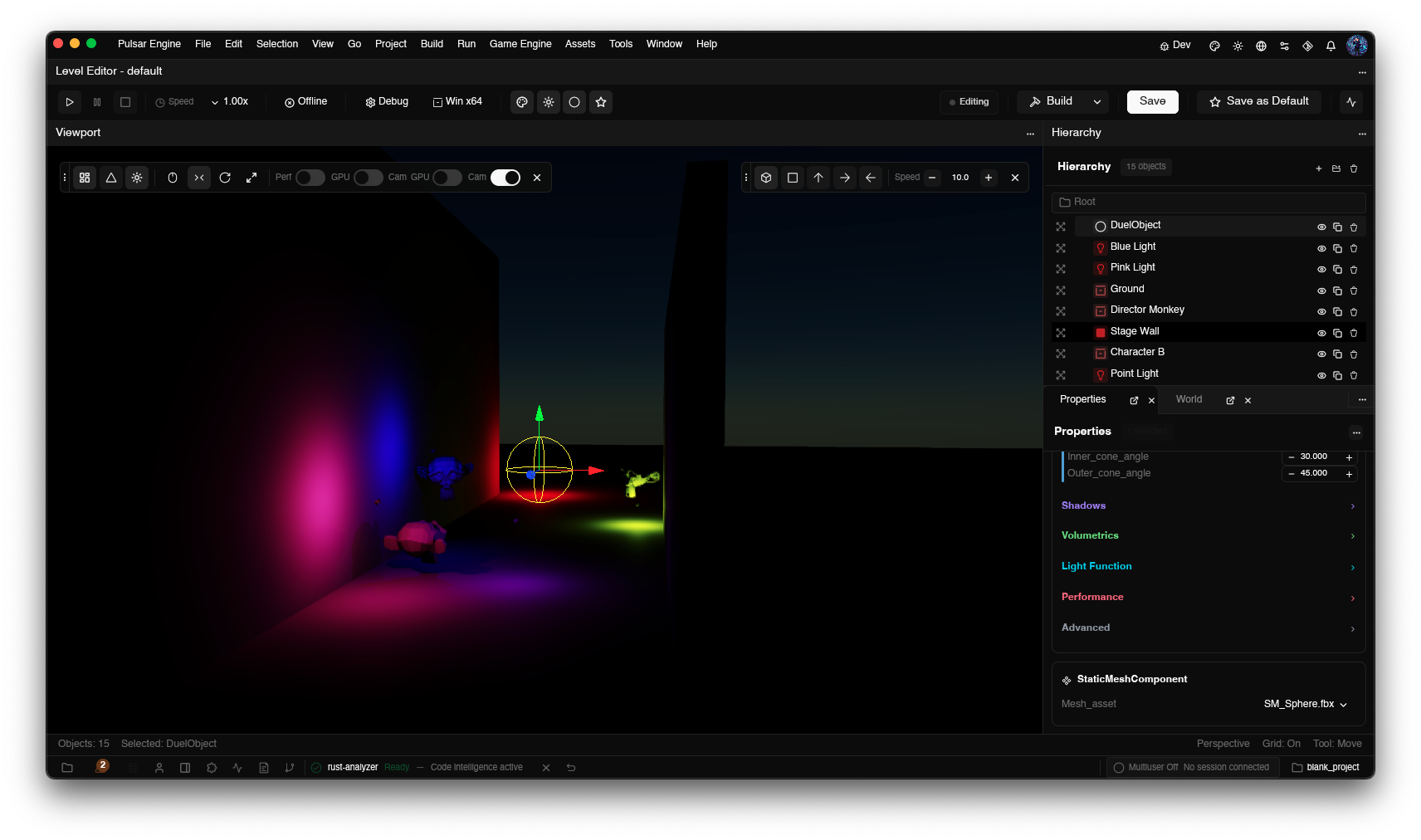
The properties panel in ui_common::reflected_properties_panel is where all of these pieces converge. When the editor selects a scene object, the panel:
- Looks up the object's component list by querying the scene database
- For each component, queries the
EngineClassRegistryfor the class and callsget_properties()on a default instance - For each property, reads the current JSON value from the scene data store
- Looks up a render function in
PropertyEditorRegistryusingtype_info.type_id - Calls the render function with a
PropertyEditorArgsbundle - Wires up change callbacks that write updated JSON back to the scene store
The PropertyEditorArgs type passed to every editor function carries everything it needs to build the widget:
Widget state — input field text, color picker HSLA values, picker selections — lives in PropertyStateManager, which is owned by the parent panel view. The manager keyed by (class_name, prop_name) pairs and stores state as type-erased Arc<dyn Any + Send + Sync> so it can hold any widget type without knowing about any of them in advance. Before calling a render function, the panel builds a HashMap<TypeId, Arc<dyn Any>> for that property's state and passes it in through PropertyEditorArgs::widgets. The render function retrieves its own state via the typed get_widget::<T>() helper:
For types that have no registered editor in PropertyEditorRegistry, the panel's render_property_row_runtime function falls back to structural rendering based on type_info.structure. Enums get a dropdown populated from the TypeStructure::Enum { variants } list. Wrapper types and structs get a read-only label showing the type name. The fallback ensures that every property always renders something, even for types whose editor hasn't been written yet, and the placeholder message explicitly names the missing type so it's easy to find and fix.
Categories are rendered as collapsible sections with colored headers. The panel groups PropertyMetadata entries by their category field, sorts groups by category_order, and renders a disclosure triangle for each group. The category_color and category_default_collapsed fields on each metadata entry control the header appearance and initial state. Because all of this comes from the macro-generated metadata, adding a new category to a component struct automatically makes it appear in the panel with the right color and default state — no panel code changes required.
Adding a Custom Property Editor
If you add a new type that needs its own UI widget — say, a curve asset reference or a spatial audio radius — the process is the same as the built-in primitives. You implement Reflectable for the type (or derive it if it's your own struct), then submit a UiPropertyEditorHint with a render function:
The erase_property_editor_fn_ptr helper is a const fn that transmutes the typed function pointer to the opaque fn() that UiPropertyEditorHint stores. This is necessary because Rust's const context restrictions prevent function pointer-to-integer casts, but transmutes between pointer-sized function pointer types are allowed. The ui_common registry reverses the transmute at startup with the opposite cast, which is sound because only PropertyEditorRenderFn-typed functions are ever submitted through this path.
Once submitted, the registration is collected automatically — no central registry file to edit, no constructor to call. The PropertyEditorRegistry is a LazyLock that collects all inventory::iter::<UiPropertyEditorHint> entries on first access and builds the HashMap<TypeId, PropertyEditorRenderFn>. From that point on, every property in every component whose type has a registered editor will get that editor in the properties panel without any further integration work.
The Full Picture
Stepping back, the flow from struct definition to live editor widget looks like this:
- You write a component struct annotated with
#[engine_class(...)]or#[derive(EngineClass)], marking fields with#[property]and organizing them into#[category]groups. - The proc macro generates
EngineClassimpl code at compile time, capturing type-erased getter and setter closures for each field and calling<FieldType as Reflectable>::type_info()to capture the field's staticRuntimeTypeInfo. - An
inventory::submit!block registers the component with the globalEngineClassRegistryso the editor can enumerate all known component types. - Separately, each primitive and custom type that wants a UI editor submits a
UiPropertyEditorHintviainventory::submit!, binding aTypeIdto a render function. - At editor startup,
PropertyEditorRegistrycollects all submitted hints and builds a lookup table. - When you select a scene object, the properties panel iterates the object's component list, calls
get_properties()on each, and for each property calls the registered render function (or the structural fallback) to produce a GPUI element. Change callbacks write updated values back as JSON, which the scene database stores and the runtime sync pass reads on the next frame.
Nothing in this chain requires the editor to know about any specific component type. You can add a completely new component, annotate it correctly, and it will appear in the Add Component menu, display a fully functional properties panel, serialize and deserialize its data, and expose its methods to the Blueprint system — all without touching any editor code. That's the point of building the system this way: the marginal cost of a new component approaches zero once the infrastructure exists.