
rust
The AI in the Machine: AI Tools and Context at Scale
How Pulsar's plugin-driven AI system lets the agent discover, traverse, and invoke tools through a macro-based pipeline — without dumping your entire codebase into a system prompt.

The Bootstrap Problem
There is a circular dependency at the heart of every game engine: you need great tools to build a great engine, but you need a great engine to make great tools. Most engines break this cycle by writing their editor tools in a scripting language — Lua, Python, C# — that can be hot-reloaded and iterated on without recompiling the native runtime. The runtime stays stable; the tooling layer is malleable.
Pulsar inverts this. The editor is the runtime. The runtime is the editor. There is no scripting layer. There is no separate editor executable. The same native binary that runs the game loop also renders the editor UI, hosts the plugin system, manages the filesystem, and now, runs the AI agent. Every tool the AI invokes is a Rust function called across an FFI boundary into a dynamically loaded plugin DLL. There is no indirection, no serialization, no interpreter overhead.
This architecture was not designed with AI in mind. It was designed for performance — a plugin editor rendering UI every frame at 60 FPS cannot afford to marshal its element tree across an IPC boundary. But it turns out that an architecture built for maximum rendering throughput is also an architecture that gives the AI agent zero-latency access to every capability in the engine.
The AI system didn't require new infrastructure. It required wiring a chat panel into the existing plugin framework and letting agents discover tools the same way the engine already discovers editors: through inventory registration, through the type system, through the reflection layer built years before the first LLM call was ever made.
The Permanent DLL Pattern
Plugin isolation is usually solved with sandboxing. WebAssembly sandboxes, process-level sandboxes, scripting language VMs. Each of these adds a serialization boundary — the plugin's data must be copied, validated, and reified on the other side before anything useful can happen.
Pulsar's approach is the opposite. Plugins are native dynamic libraries loaded into the main process address space. They share the same heap, the same GPU device handles, the same scene database, the same undo stack. A plugin's editor returns a UI element tree every frame through a direct function call — no serialization, no copy, no indirection.
This is the permanent DLL pattern. Plugins are loaded at startup and stay resident until the engine shuts down. There is no sandbox, no restart, no hot-reload cycle. A plugin that crashes the address space takes everything with it — which sounds terrifying until you realize that this is exactly the same threat model as every native code module in the engine. The plugin system doesn't introduce new risk; it extends the existing trust model to third-party code.
For the AI agent, this means zero-latency tool execution. When the agent decides to invoke a tool, the call goes from the LLM response parser directly to a function pointer in the loaded plugin. There is no socket, no subprocess, no JSON-RPC round trip. The tool completes in microseconds, and the result streams back into the chat context on the same frame.
Tools Are Just Decorated Functions
The foundation of the AI system is the tool definition pipeline. In Pulsar, tools aren't JSON schemas that drift from implementation, and they aren't registered in a separate configuration file. They're plain Rust functions with a #[tool] macro.
The #[tool] macro reads the function signature, extracts the Rustdoc comments, and embeds all of that metadata into the compiled binary through inventory — the same registration mechanism the engine uses for window types, property editors, and file format handlers. At runtime the AI subsystem discovers these registrations and serves them to the agent as structured tool definitions: function name, parameter schemas with descriptions, type information, and documentation generated directly from the Rust source.
There is no separate tool definition file. No JSON schema to maintain. No SDK to install. The code is the documentation. The documentation is the tool instruction.
When a plugin developer writes a new editor for a new file type, they also write the tools that operate on that editor. The AI discovers these tools without any additional configuration because the registration is baked into the binary at compile time. This is the same mechanism that lets the engine discover new window types and new property editors — the AI tool system didn't invent new infrastructure. It plugged into existing infrastructure that was already there.
Scoping Tools Through the Plugin Hierarchy
Tools don't exist in a flat global namespace. They belong to plugins, and plugins register them alongside the editors they provide for specific file types.
When the agent is working on a .pulsar_scene file, it sees set_skybox as an available tool. When it switches to a Rust source file, set_skybox disappears from the tool tree because the Rust editor plugin doesn't provide it. The agent never sees tools for file types that aren't open — not because the engine hides them, but because they quite literally do not exist in the current resolution scope.
This scoping is critical for small context models. A model with a 16K context window cannot navigate a 50K-token system prompt enumerating every tool across every plugin. But it can navigate a small directory tree of tool categories, calling a built-in list_tools or describe_tool command to drill into details on demand. The agent treats the tool tree like a filesystem — it starts at the root, lists the available branches, and expands the ones it needs.
The engine provides a handful of built-in navigational tools that are always available regardless of which plugins are loaded:
list_tools(path)— lists tool categories or individual tools at the given pathdescribe_tool(path)— returns the full parameter schema and documentation for a specific toolcall_tool(path, args)— invokes a tool and returns the result
These three tools are the entire system prompt. Everything else is discovered dynamically.
The Reflection Connection
Pulsar's reflection system, built years before the AI agent was conceived, turns out to be the missing link between tool descriptions and live engine state. The pulsar_reflection crate provides runtime type information for every component and property in the engine — including the ability to iterate fields, read their current values, and invoke registered property editors.
The AI agent doesn't use reflection directly. It uses the tools that plugins register, and those tools often use reflection internally. When the agent calls set_material(mesh_id, material), the tool implementation uses reflection to find the mesh component in the scene, locate its material property, and update it. The agent never needs to know about the reflection layer — it just calls a named function with typed parameters.
But reflection also enables something more interesting: tools that generate themselves from type information. A generic edit_property(entity, property_path, value) tool can reflect on any component at runtime, discover its properties through the Reflectable trait, validate the input, and apply the change — all without the plugin author writing a single line of tool-specific code. The reflection system provides the schema; the tool macro wraps it in an LLM-compatible definition.
This generic tool handles every component in every plugin without any per-component registration. The reflection layer provides the mapping between JSON values and native Rust types; the tool macro provides the LLM-compatible wrapper.
EngineFS: The Agent's Window Into the Workspace
The AI agent never has direct access to files on disk. It doesn't read std::fs, and it doesn't execute shell commands against the raw filesystem. Every file operation goes through engine_fs — Pulsar's virtual filesystem layer.
The agent sees a virtualized view of the workspace. It can list directories, read file metadata, inspect the project layout. It never touches raw bytes on disk directly. The abstraction buys several things simultaneously:
Security isolation. The agent cannot read files outside the project boundary. It cannot write to system directories. It cannot execute arbitrary binaries. The virtual filesystem is the only interface to the outside world, and the engine controls exactly what it exposes.
Unified remote access. The same FsProvider trait serves local files, files from Pulsar Studio's cloud hosting, and files from a peer-to-peer collaboration session. The agent does not know or care which backend is in use. The same read_file call that resolves to a local SSD on your development machine resolves to an HTTPS GET when you open a project from the cloud. The agent's tool implementations are backend-agnostic by construction.
Discoverable context. Instead of guessing which files to dump into a prompt at the start of a session, the agent explicitly navigates the workspace tree, reads files on demand, and builds context incrementally. It loads what it needs and nothing more. When the user asks "refactor this module," the agent reads that module. When it discovers a dependency, it reads the dependency. Context is demand-paged, not pre-loaded.
This is the just-in-time context model. The system prompt stays small — a few hundred tokens of navigational instructions and the three built-in tools. Everything else is fetched on the fly as the agent explores.
Edit Through State, Not Through Bytes
The most common failure mode for AI code assistants is file corruption. A model generates a diff with the wrong byte offset, misses a closing brace, or misformats a structured text format. The result is a broken file and a frustrated developer. The agent cannot see the error because it does not have a way to validate its output, and the developer cannot use the tool until they manually fix the damage.
Pulsar avoids this entirely by requiring the AI to edit through the plugin's editor state, not through raw file manipulation.
The agent cannot write bytes to a file directly. It must open an editor for the file type, then target that editor instance with mutation tools. The plugin's native Rust code handles serialization. The output is guaranteed to be syntactically correct because the plugin is doing exactly what it always does — writing its own file format.
The AI acts as a controller in a Model-View-Controller pattern. The plugin editor is both the View (it renders a UI element tree every frame) and the Model (it owns the in-memory scene state). The AI issues commands; the editor mutates its state; the UI reflects the change on the next frame automatically. The user can watch the editor update in real time as the agent works.
Because mutations happen inside the editor's state, they flow naturally through the engine's undo and transaction system. If the agent makes a bad edit, the user hits Ctrl+Z — no need to revert a broken git diff, no need to reconstruct lost work from version control. The edit was a transaction in the editor's history, and it rolls back like any other transaction.
The Provider System: 15 Entries From One Crate
The Agent Chat panel connects to a provider system built on a ProviderCrate trait that lets any Rust crate register multiple provider entries through a single implementation.
A single crate, agent_provider_openai, registers fifteen entries — OpenAI, Groq, Together AI, Mistral, DeepSeek, Fireworks, Perplexity, xAI Grok, OpenRouter, Cohere, Azure OpenAI, Ollama, LM Studio, llama.cpp, and vLLM. Each entry defines its own config schema: which fields are required, which are sensitive (API keys that should be masked in the UI and encrypted at rest), and what the default endpoint URL should be.
The engine presents these config fields as a form in the chat panel. The user fills in their API key, clicks save, and the engine calls validate_config() on the configured provider — which makes a lightweight API call to verify the key is valid before storing anything. If the key is invalid, the form shows the error in red and clears the sensitive fields. No keys are stored until validation passes.
Models are never hardcoded. Every provider discovers its model list from a live API call to the provider's models endpoint. The model list is fetched lazily when the user selects a provider and cached in memory until the engine shuts down. This means new models added by providers appear automatically — no engine update required.
The provider system also handles re-validation transparently. When the user navigates back to a previously configured provider, the engine calls validate_config() again in the background. If the token has expired or been revoked, the provider reverts to its unconfigured state and the config form re-appears with the error message. The user never gets an opaque 401 response in the middle of a conversation.
Agents, Skills, and the Open Ecosystem
The chat panel is the visible surface of a deeper system. Below it sits the agent framework — a tool-calling loop that routes the model's responses through the tool tree, collects results, and feeds them back into the conversation context. The agent framework is model-agnostic. It works with any provider that implements the ChatProvider trait, and it negotiates capability differences automatically: if a provider doesn't support tool calling, the agent falls back to a text-based protocol where the model describes its intended tool invocation in a structured format and the engine parses and executes it.
The skill system extends the agent framework with reusable, context-aware capabilities. A skill is a packaged set of tools, instructions, and prompts that a plugin can register for specific scenarios. The scene editor plugin might register a "lighting setup" skill that provides specialized tools for adjusting global illumination parameters. The material editor plugin might register a "material creation" skill with tools for generating PBR material graphs from natural language descriptions.
Skills are composable and discoverable through the same inventory registration mechanism as tools. The agent can list available skills, inspect their capabilities, and activate them when the conversation context warrants it.
Why Not Just Use MCP?
The Model Context Protocol has become the standard way to connect LLMs to external tools. It provides a well-defined interface for tool discovery and invocation, and it's supported by every major LLM provider. So why not just use MCP as the tool layer and skip the plugin system entirely?
MCP is designed for server-side tool execution. The tool runs on a remote server, communicates over HTTP or SSE, and returns results asynchronously. This works well for web applications where the tool is an API call to an external service. It works poorly for a game engine where the tool is a function call that mutates in-memory scene state and expects the UI to reflect the change on the next frame.
A round trip through an MCP server adds latency that breaks the interactive editing loop. The agent says "set the skybox to sunset," the tool call goes to the MCP server, the MCP server calls back into the engine, the engine mutates the state, the result propagates back through the MCP server to the agent, and the agent confirms the change. By the time the user sees the updated skybox, several hundred milliseconds have elapsed.
With Pulsar's direct FFI approach, the same operation completes in microseconds. The tool call is a function pointer invocation. The state mutation is a direct memory write. The UI refresh happens on the next frame, 16 milliseconds later. The user sees the skybox change before the agent has finished composing its confirmation message.
This doesn't mean MCP is irrelevant. Pulsar supports MCP as an additional tool source — if a plugin wants to expose a remote API as a tool, it can register an MCP server configuration and the agent framework will discover and invoke its tools through the standard protocol. But the critical path — the tools that mutate engine state — runs through direct FFI because the latency of interactive editing demands it.
Multiplayer and Collaborative Agents
The EngineFS abstraction and the plugin-scoped tool hierarchy unlock a multiplayer architecture that extends naturally to AI agents. A peer-to-peer collaboration session runs the same FsProvider backend as a local project — the only difference is that file operations go through a P2P message exchange instead of a local disk read. The agent running on one peer can read and write the same project state as the agent running on another peer, with the same tool discovery, the same stateful mutation pattern, and the same undo history.
This opens up collaborative agent workflows that are difficult to build on top of conventional file-based editors:
-
Parallel agent execution. Two agents work on different parts of the same project simultaneously, each operating through its own editor instances, both serializing through the same shared filesystem backend.
-
Agent-assisted code review. An agent observes the diff stream from another peer's session, analyzes changes for correctness and style, and posts suggestions into a shared conversation channel.
-
Agent-facilitated merge conflict resolution. When two peers modify the same file, the editor's stateful mutation history provides a structured diff that an agent can analyze and resolve — not by guessing the correct text, but by replaying the mutation transactions and reconciling them semantically.
The Provider Config Lifecycle
The provider system includes a complete configuration lifecycle that handles auth state gracefully. Providers declare their config fields declaratively — which allows the engine to build a generic config form for any provider without knowing its specifics.
When the user navigates away and comes back, the engine re-validates the stored config:
This re-validation catches expired tokens without requiring the user to discover the problem at an inopportune moment — like when a long-running refactoring operation fails halfway through because the API key expired mid-conversation.
Agent Chat: The First Frame
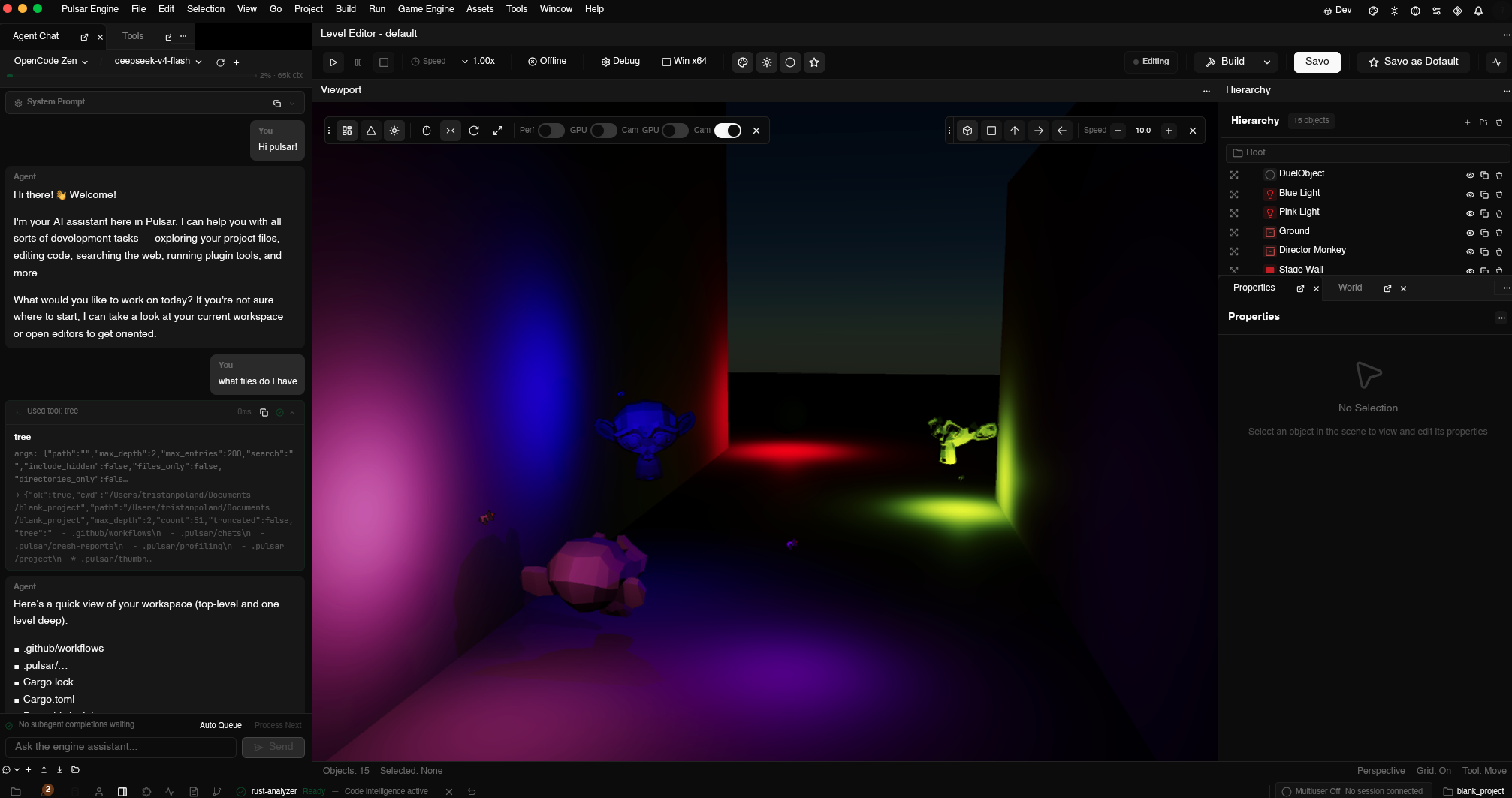
The Agent Chat panel is now running inside the Pulsar workspace. The model selector lists available providers, each populated from a live API call to the provider's models endpoint. The token context bar shows the budget for the current model — calculated from the model's documented context window minus the current message length. The system prompt section is collapsible, letting the user inspect exactly what instructions the agent is working with at any time.
The tool-calling loop is operational. The agent can traverse its tool tree, discover capabilities, invoke them, and process results. The EngineFS integration gives it safe, structured access to workspace files. The plugin system ensures that tools are scoped to the right file types and editors. The reflection layer provides generic property editing without per-component boilerplate.
The provider system handles fifteen API formats through a single trait, discovers models dynamically, validates keys before storing them, and re-validates on session return to catch expired tokens silently. The config form is generated from the provider's declarative schema — no per-provider UI code needed.
What's Next
The tool-calling loop works. The provider system works. The EngineFS integration works. The reflection-backed generic tools work. The immediate next focus is the autonomy layer — letting the agent decompose complex goals into sub-tasks and delegate them to specialized sub-agents that can run in parallel.
The sub-agent system is designed around the same ChatProvider trait as the main agent. Each sub-agent gets its own model assignment, its own tool scope, and its own context budget. The main agent decides when to spawn a sub-agent, defines its task, and receives its results as structured events. Sub-agents can spawn further sub-agents, creating a recursive decomposition tree that mirrors the tool tree's hierarchical structure.
The execution isolation question remains open for third-party plugins. Currently every plugin runs in-process through direct FFI, which gives maximum performance but zero fault isolation. For the engine's built-in plugins — the scene editor, the material graph editor, the shader editor — this is the right trade-off. For community plugins downloaded from a marketplace, we want process-level sandboxing with the option to promote trusted plugins to in-process execution.
The AI in the machine is waking up. It does not need your entire codebase in its context window to be useful. It needs a small navigational toolkit, scoped tool discovery through the plugin hierarchy, stateful mutation through live editor instances, and the discipline to load context on demand. The infrastructure for this was not built for AI — it was built for performance. But it turns out that an architecture designed for maximum rendering throughput is also an architecture that gives the AI agent zero-latency access to every capability in the engine.
The code is the documentation. The documentation is the tool instruction. The tool invocation is a function pointer call across an FFI boundary into a plugin loaded at startup and kept resident until shutdown. There is no sandbox, no interpreter, no JSON-RPC round trip. Just a direct path from the model's response to a native Rust function that mutates live engine state and puts the result on screen 16 milliseconds later.